Most people searching for an online PDF converter with no upload have a simple reason: they have a file that shouldn't leave their device. A contract. A medical form. A tax document. They want a PDF — not a copy of their file sitting on someone else's server.
Here's the problem: most online PDF converters do upload your files. They just don't say it that clearly. This article explains exactly what happens to your files with both types of tools, so you can make an informed choice.
What Most PDF Converters Actually Do With Your Files
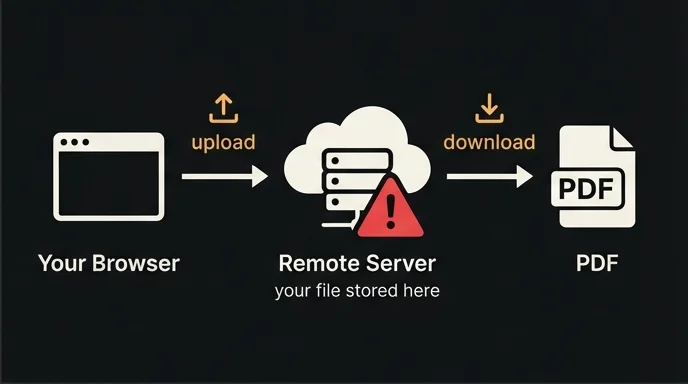
The majority of online PDF converters follow the same model — and most don't advertise it clearly:
- You select or paste your file/content.
- Your browser uploads it to a remote server.
- The server processes the file, generates a PDF, and sends it back.
- The original file (and sometimes the generated PDF) sits on that server for some period of time.
This is how tools like Smallpdf, ILovePDF, and most other popular converters work. If you've been looking for an online PDF converter no upload experience, these are not it — they require a server round-trip for every conversion.
What Happens to Your File After Upload?
This depends entirely on the service. Most converters have a privacy policy that says something like:
"Files are automatically deleted after 24 hours."
That may be true. But it also means:
- Your file exists on a third-party server for up to 24 hours.
- If that server is breached during that window, your file is exposed.
- You have no way to verify deletion actually happened.
- Metadata (IP address, file name, upload timestamp) may be retained longer than the file itself.
- Some services use uploaded content to train AI models — check the fine print.
For a recipe or a blog post, this is a non-issue. For a contract, a medical record, or a client report, it's a real risk you're accepting every time you click "Convert."
What Happens With an Online PDF Converter No Upload
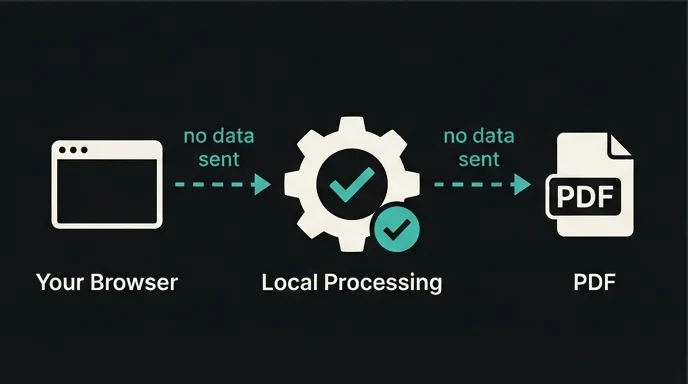
A genuinely no-upload PDF converter works differently from the ground up. When you use TextToPDF.me:
- You paste or type your content into the editor.
- The PDF conversion runs entirely inside your browser tab — on your own device.
- The PDF is generated in your browser's local memory.
- You download it directly — no server ever receives your file.
That's what "no upload" means in practice. The file never travels. There's nothing to breach, no retention period to worry about, no privacy policy to read and hope they're following.
What It Does and Doesn't Protect Against
"Secure" is often used loosely. Here's what using an online PDF converter with no upload actually protects:
What it protects against:
- Server-side data breaches at the conversion provider
- Unauthorized access to your uploaded files
- Retention of your content after conversion
- Data harvesting by the tool provider
What it doesn't protect against:
- Malware or keyloggers already on your local device
- Your employer's network monitoring (if you're on a work device)
- Browser extensions with broad permissions that can read page content
In short: a pdf converter no upload removes the third-party server from the risk entirely. What remains is your own local environment — which you already control.
Side-by-Side Comparison
| Regular Online Converter | PDF Converter No Upload | |
|---|---|---|
| Where processing happens | Remote server | Your device |
| Data transmitted | Your full document | Nothing |
| Retention risk | Yes (varies by provider) | No |
| Works offline | No | Yes (once page loads) |
| Speed | Depends on server load | Depends on your device |
| Privacy policy dependency | High — you're trusting their policy | None — no data shared |
| GDPR / compliance | Varies | Not applicable (no data transfer) |
When You Actually Need a PDF Converter With No Upload
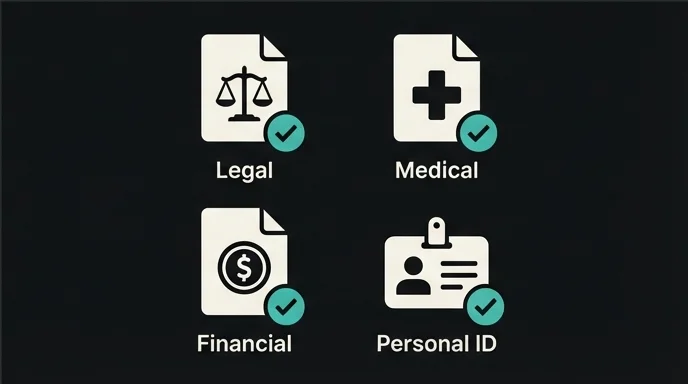
An online pdf converter no upload isn't necessary for every document. Converting a public blog post to PDF? Any tool will do. But these document types should never go through a server-upload converter:
Legal Documents
Contracts, NDAs, settlement agreements, court filings. Uploading these to a third-party server — even briefly — may violate the NDA itself, or breach a duty of confidentiality if you're a legal professional. Use a pdf converter no upload for anything covered by privilege or confidentiality.
Medical Records
Patient data is governed by strict regulations (HIPAA in the US, GDPR in Europe). Using an unvetted online tool that uploads your files to convert patient records to PDF is a potential compliance violation, regardless of convenience.
Financial Documents
Tax returns, pay stubs, bank statements, investor reports. Financial data is a primary identity theft target. The "deleted after 24 hours" window is 24 hours of exposure you didn't need to create. An online pdf converter no upload eliminates that window entirely.
Proprietary Business Content
Unpublished product plans, internal memos, client lists, pricing models. Most employment agreements include a confidentiality clause. Uploading sensitive business content to a third-party conversion service may breach it — even if you're just trying to make a PDF.
Personal Identification
Passport scans, driver's license copies, social security information. There is no scenario where these should transit a third-party server for a file conversion. Always use a pdf converter no upload for identity documents.
A Note on GDPR and Data Residency
For users in the European Union, data sovereignty is a legal concern, not just a preference. When you upload a document to a US-based server, that data crosses jurisdictional boundaries and may trigger GDPR obligations.
An online pdf converter no upload sidesteps this entirely: no data transfer means no cross-border data flow means no jurisdictional exposure. The document stays on your device, in your country, under your control.
How to Verify a Converter Has No Upload
Before trusting any tool that claims to be a pdf converter no upload, verify it yourself:
- Does the privacy policy explicitly state that files are not uploaded? (Vague "deleted after X hours" language means they are uploaded.)
- Open DevTools → Network tab, then convert a document. A real no-upload converter sends zero outbound requests carrying your content.
- Is the processing described as "in your browser" or "on our servers"?
- Does the tool require an account? An account links your documents to your identity.
- Does it work after you go offline? If yes, it's genuinely local. If no, it depends on a server.
Most tools fail at step two. Try it.
Frequently Asked Questions
How does an online pdf converter with no upload actually work?
Modern browsers are powerful enough to run full applications locally — the same way a mobile app works without a constant server connection. The PDF is generated entirely inside your browser tab. Nothing is sent over the network. You can confirm this by watching the Network tab in DevTools during a conversion.
Does a no-upload PDF converter work on mobile?
Yes. Your phone's browser handles the conversion the same way a desktop browser does. Performance may be slightly slower on older devices for very large documents, but the process is identical — no upload on mobile either.
What if I close the browser tab before downloading?
The content in the editor is lost — nothing was saved anywhere. This is intentional: no persistent storage means no data retention risk. Save your source text separately if you're working on a long document.
Is output quality as good as server-based tools?
For standard use cases — formatted text, fonts, page sizes, multi-page documents — yes. Where browser-based pdf converters no upload currently lag behind is complex layout control (precise image placement, multi-column layouts). For most documents, the output is equivalent.
Try an Online PDF Converter With No Upload
If you have documents that shouldn't leave your device, TextToPDF.me is an online PDF converter with no upload, no account, and no server involvement.
- Open the PDF Converter — Paste or type, preview, download. Your file never leaves your browser.
- Batch Convert TXT to PDF — Convert multiple files at once, all processed locally.
No account. No upload. No server. Your document stays where it belongs — with you.